 Manual
Manual · The book
Backups & restore
Automatic copies, packages, passwords — and what a restore really does.
The package
A backup is a .neuridionbackup package: a folder the Finder
shows as one object, holding data.sqlite,
files.sqlite and a manifest.json written for
humans. The ten-year promise lives in that shape — inside are ordinary
SQLite files under obvious names, readable by any tool that speaks
SQLite, whether or not Neuridion is still around. Right-click, Show Package
Contents, and there they are.
Automatic, rotated, cheap
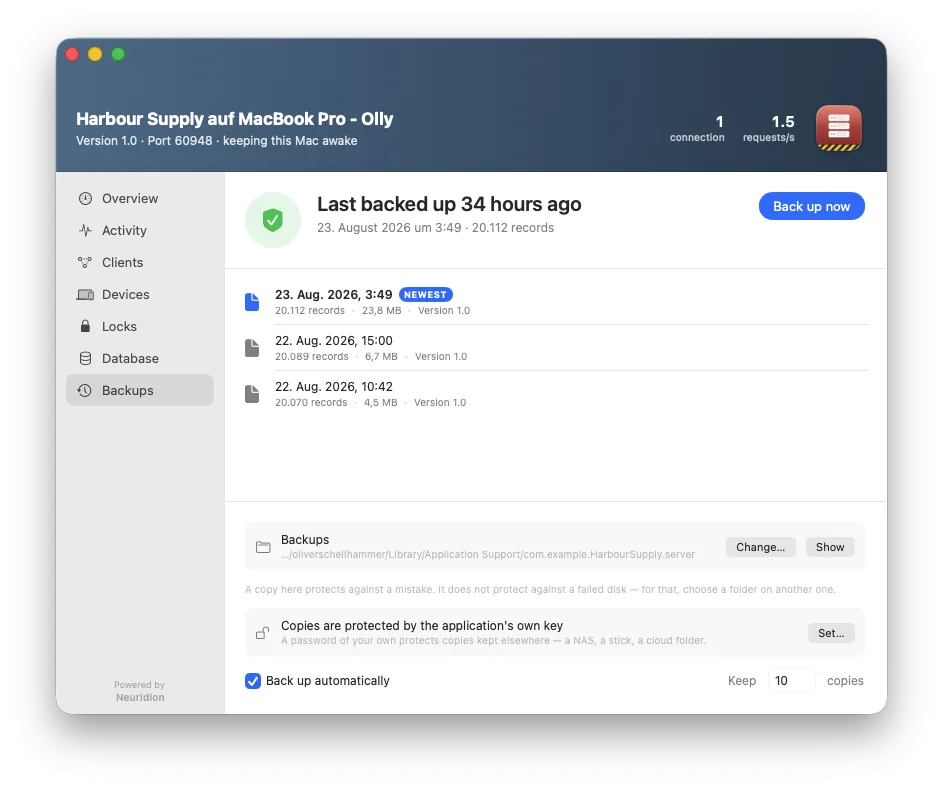
Copies happen by themselves once something changed; the newest n are kept — and never fewer than one, whatever the number says. On APFS the documents are cloned when nothing moved: ten backups of three gigabytes of scans cost three, not thirty, and every package stays independently restorable.
Where they go, and the honest failure
The folder is chosen on the machine (never a project setting — a path is about one Mac). A copy beside the data protects against a mistake, not against a failed disk — the window says so, and when the chosen folder cannot be reached it tells you the copies are landing locally instead of failing silently: believing your data left the machine when it did not is the worst outcome a backup can have.
A password of its own
A backup can carry its own password — for the copy that leaves the house on a stick or a NAS. Restoring asks for it; the application's own key never travels.
Restore is a restart
Restoring first takes a safety copy of the present, then the application ends and begins on the restored data — an open window over replaced data would be a lie. Refusals come first: a backup from a different application, or a newer schema than the application understands, is refused with the reason, and half a package (records without their documents) is refused rather than restored hollow. On a running server, restore is a ceremony of its own — see Client / Server.