What's new.
Every version and what changed in it. Neuridion does not tell you about this page — nothing it runs, and nothing it builds, contacts us to announce anything. Bookmark it, or look when you feel like it.
Releases
0.9.2
Current 24 August 2026A polish release: the windows got more modern, the help got closer, and long jobs got a progress bar with a Cancel that means it.
- Header to the top. A window's coloured header can now run to the very top, with the traffic-light buttons sitting on it — the modern Mac look, one checkbox per window. The example uses it everywhere, and the form designer draws the buttons on the band so you know which corner to keep clear.
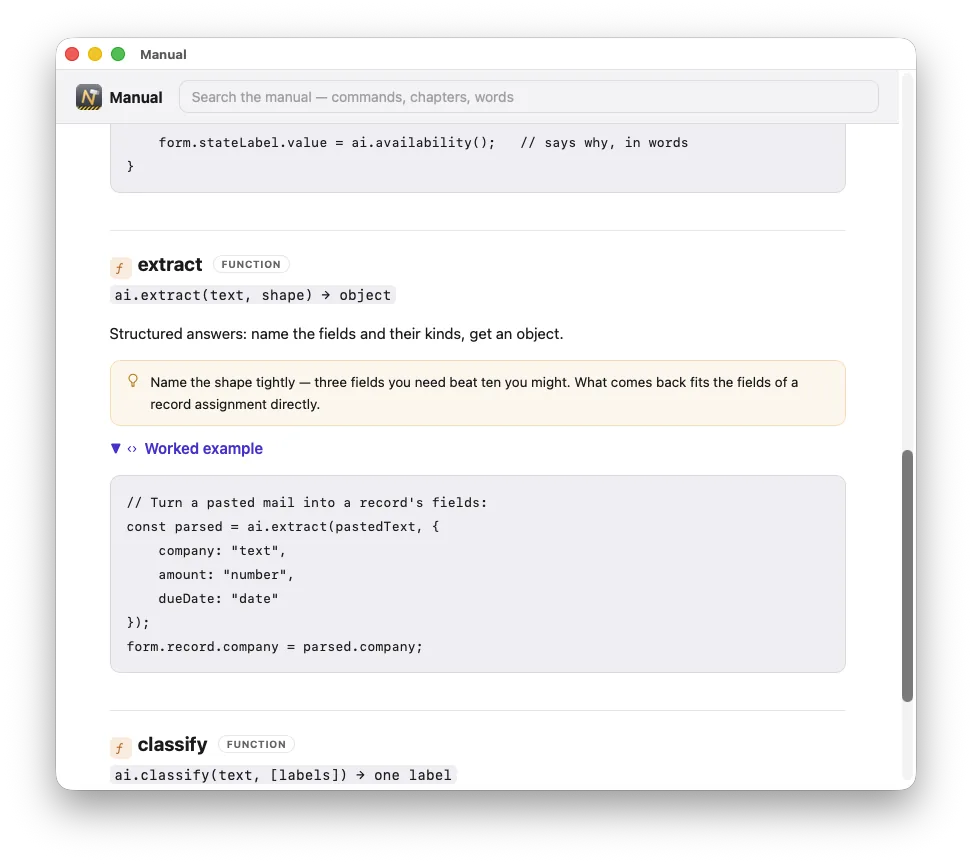
- The manual, one press away. The completion list and the parameter help both carry a book now: click it — or press ⌥↩ — and the manual opens at exactly that command, format and worked example included.
- Import and export show progress — the application's own progress bar, with a Cancel that rolls a half-done import back to exactly nothing.
- Record locking, by hand too:
record.lock(),unlock()andlockedBy(), with their own manual chapter. On a server, locking stays automatic — taken at the first change, never on open. - The About window is yours: free text with working links, written in the application settings — bold, italic, or just a line of copyright.
- Build output, your choice: just the app, a zip, or a designed disk image — icons, arrow, drag to Applications — now also for client-server builds, with all three products in a row.
- Server room: the network path was separated from the write lane and dead connections are noticed in seconds, so many clients feel lighter; the requests-per-second figure now tells the truth; and the status window wears the application's colour up into the title bar.
- Client care: after a self-update the previous version goes to the Trash instead of standing beside the app, and the client's About shows its own icon.
- The licence has a window of its own, and a by-hand update check answers right where you are — neither drags the welcome window up any more.
0.9.1
23 August 2026A big one, and all of it built and running — not a plan.
- Client/Server is here. One server holds the data, a client on every desk — they find the server on the network, pair with a six-digit code, and every wire is end-to-end encrypted. Record locks say who is editing what and let go the moment they leave a field; the server carries its own client, so new desks and updates need no hand-copying. It ships as Neuridion PRO, on sale now.
- A full manual — every command with a worked example, the form objects, and honest chapters on performance and limits. In the IDE behind the book button, and on this site.
- The server watches itself: a status window with request and answer-time curves, the slowest queries, every connected desk live — and now a lane-utilisation gauge and a connections-over-time chart, so you can see at a glance whether the server is bored or at its limit.
- A log for every product (IDE, single-user, client, server) with levels — errors and warnings always, the rest by a project setting. When something goes wrong at a customer's, that file is what they send you.
- The IDE now checks for a newer version at start-up (a switch in Settings stops it). Nothing it builds ever does.
- Restore works on a running server; the reconnect overlay, pairing and the build dialog all got their rough edges filed off.
0.9.0
20 August 2026 · first public betaThe first version anybody outside can download. Everything below is built and running — nothing in this list is a plan. What is still missing is on the roadmap, with reasons.
The two days before it left the building
The version was finished in a stretch, and these are the things that changed in it last. They are listed first because they are the ones most likely to surprise somebody who saw an earlier build.
- Every list can do things to a row. Add · Duplicate · Remove are buttons the list brings with it — they open the right window, set the relationship, leave out the unique and computed fields when copying, ask before deleting and do it in one transaction. They also grey themselves out when nothing is selected. A fifth kind just runs a script of yours. Nobody writes those three lines again, and nobody forgets the reload afterwards.
- Computed fields. A field whose value is a formula —
total = quantity
          * price
— stored as a real column and filled on the way in, so sorting and summing it is the database's job. Change the formula later and every existing row is worked out again on the next start, in dependency order. - Setting a list up happens at the list, in a sheet of its own: columns, row buttons and behaviour, with the real list as a live preview and dragging to reorder. The inspector holds an object's properties; a sheet holds its collections.
- The find, sort, import and export windows are on every list, not just one — and in a Data menu as well. They are windows your customer gets, in the application you ship, without you building any of it.
- Sound joins the messages group.
messages.beep()andmessages.playSound(name)— your own files from the project assets or any of macOS's fourteen. Two in the same tenth of a second are one, so a loop over four thousand rows is not four thousand noises. - The example projects were rebuilt. Harbour Supply is now eleven windows, 89 scripts and seven reports and uses all 26 kinds of form object — it had been half a demonstration, with cards that opened whichever record happened to be first. The benchmark was rebuilt too: three cards that say in words what changed, and a chart that draws only what actually moved.
Starting a project
- Three ways in. Empty; or from an example that arrives with its data, so the first thing you see is a working application whose copy is genuinely yours; or describe your business in a paragraph and let a model propose the data model.
- The describing route asks back. Two to five multiple-choice questions rather than an open conversation, every one with a fallback so nothing blocks the button. Whatever comes back that does not hold up — a field type that does not exist, a relationship between tables nobody mentioned, a script that does not parse — is left out and named on screen before anything is created.
- Names come back in the language you wrote in. Your tables, your words.
- And that is the only place a model is involved. There is no assistant looking over your shoulder while you work, and there will not be one.
Building windows
- The window assistant asks which fields, in what order and grouped how, with a live preview drawn by the same builder that makes the real thing. Groups become frames or tab pages and you decide which — with the height quoted, so a form taller than a laptop screen is something you read rather than discover.
- The list is real AppKit — draggable columns, editing in the cell, no thousand-row ceiling, and a footer under each column that sums over the whole set rather than over what is on screen.
- Named styles. Seven decisions under one name, with a default per kind of object; the object always wins as a visible exception, and a script can put a style on while the application runs.
- Twenty-six kinds of object, charts and barcodes among them, and every one of them is used by the example that ships — which is how we know they all work.
Working with data
- Choosing a record has four faces — menu, live search, a chooser sheet with your columns, or automatic by counting — and a button beside the field that opens the record you picked.
- Find & sort, import and export are windows your customer gets too, not just you: several conditions with AND/OR, several sort fields, saved searches they name themselves, import profiles that remember the shape and never the path.
- Backups that only happen when something was actually written, rotated, with an optional password of their own kept in the keychain. A backup is a plain SQLite file — readable in ten years by anything.
- Money is a whole number of minor units, everywhere, with one place that converts it and a test nailing the awkward cases down.
- The database migrates itself when your customer updates: columns and tables matched by identity rather than by name, so a rename stays a rename, and a safety copy taken before any of it runs.
Writing the parts that are yours
- The editor knows your schema: a mistyped table name gets a dotted underline and a suggestion, ⌘-click opens what you clicked, and help appears when the pointer rests — the field's type, whether it is required, and the note you left in the designer.
- A debugger worth using: conditions and hit counts on breakpoints, step over and out, values you can open, a post-mortem after a throw, and a query log that makes an N+1 loop visible at a glance.
- The whole API is synchronous and grouped.
database,form,record,eventandlogare the only free names; everything else lives in a group — including the newest,system, for questions about the machine and the person at it. - On-device intelligence. Detect a language, translate, pull fields out of a paragraph — on the customer's own Mac, with no key, no network and no cost. Or point it at a provider of your choosing.
Shipping
- Build to a signed, notarised
.appor DMG. Every application gets a real icon from one picture, drawn into the shape macOS icons wear — and a default one if you supply nothing, rather than the grey placeholder. - Starting data: ship the lookup tables (postcodes, VAT rates, the first administrator) and nothing else, chosen by table and remembered by identity.
- Several projects open at once, one window each.
- Nothing you build ever asks anybody for a licence. No key, no expiry, no network call — see how licensing works.
Known limits, said out loud
- The project format can still change before 1.0 and there are deliberately no compatibility shims. A project made today may not open in a later version.
- 0.9.0 never tells you a new version exists. Look at this page when you want to know. From 0.9.1 the IDE asks this site once at start-up — nothing sent along, and a switch in Settings to stop even that. Applications you build never ask us anything, at any time, in any version.
- Neuridion's own windows inside a built application are English only for now: the backup window and the standard dialogs, in front of a German customer's customers. Translating them is on the 1.0 list.
- Multi-user is in the beta: the Client/Server build — one server holding the database, a client on every desk, record locking, pairing over the local network. It ships with 1.0 as Neuridion PRO.
- The beta IDE has no expiry. Applications you shipped are unaffected, for ever.